Components in Vue.js: Understanding Local, Global, Parent-Child, Dynamic & Reusable Components
Components in Vue.js: Understanding Local, Global, Parent-Child, Dynamic & Reusable Components
SkilltoGrowth Expert
Published on July 31, 2026As web applications grow larger, writing all the HTML, CSS, and JavaScript in a single file quickly becomes difficult to manage. Imagine building an e-commerce website where every page contains a navigation bar, product cards, shopping cart, footer, user profile, search bar, and dozens of other UI elements. If all of these were written inside one file, maintaining the application would become time-consuming and error-prone.
This is where Components become one of the most powerful features of Vue.js.
A component is a self-contained, reusable piece of the user interface that combines its own structure, logic, and behavior. Instead of building an entire application as one large page, Vue encourages developers to divide it into smaller, independent components. Each component is responsible for a specific part of the application and can be reused wherever needed.
Think of components as building blocks. Just as a house is constructed using bricks, doors, windows, and roofs, a Vue application is built using components such as headers, navigation menus, product cards, buttons, forms, sidebars, and footers. Each component performs a specific task while working together to create a complete application.
Component-based architecture is now the standard approach in modern frontend development. Frameworks such as Vue.js, React, Angular, and Svelte all rely heavily on reusable components because they improve maintainability, scalability, and code organization.
In this chapter, you'll learn what Vue components are, understand the difference between local and global components, explore parent-child relationships, nested and dynamic components, asynchronous components, component communication, reusable component design, and the best practices for building scalable Vue applications.
Why Components Are Important
Components solve one of the biggest challenges in software development—managing complexity.
Instead of maintaining one enormous file containing every part of an application, developers divide the application into smaller, independent modules that are easier to understand, develop, and test.
Using components provides numerous benefits:
- Better code organization
- Reusable user interfaces
- Easier maintenance
- Faster development
- Improved scalability
- Better collaboration between developers
- Simplified testing
- Consistent user experience
Whether you're building a simple blog or a large enterprise dashboard, components help keep your application structured and manageable.
Introduction to Components
A Vue component represents an independent section of the user interface.
Each component contains everything required for its functionality, including its template, logic, styling, and data handling. Because components are isolated from one another, changes made inside one component generally do not affect the rest of the application unless data is intentionally shared.
For example, an online shopping application may contain separate components for:
- Navigation bar
- Product card
- Shopping cart
- Search box
- Product filter
- Customer review
- Footer
- User profile
Rather than rewriting these sections on every page, developers create each component once and reuse it wherever necessary.
This approach significantly reduces duplicated code while improving maintainability.
Local Components
A Local Component is available only within the component where it has been registered.
This means it cannot be accessed by other parts of the application unless it is explicitly imported and registered again.
Local components are ideal when a user interface element is used in only one specific area of the application.
Examples include:
- Login form
- Product filter panel
- Checkout summary
- Profile editor
- Order confirmation section
Using local components helps keep applications organized because functionality remains limited to the area where it is actually required.
It also reduces the risk of unnecessary dependencies across the project.
Global Components
A Global Component can be used anywhere within the application after it has been registered globally.
These components are typically shared across multiple pages and features.
Examples include:
- Navigation bar
- Footer
- Company logo
- Primary button
- Loading spinner
- Notification banner
- Modal dialog
- Error message component
Global components reduce duplication because developers define them once and reuse them throughout the project.
However, they should be used carefully. Registering too many global components can increase application complexity and make projects harder to maintain.
Generally, only truly reusable UI elements should be registered globally.
Parent and Child Components
Vue applications are built using hierarchical component relationships.
A Parent Component contains one or more Child Components, creating a tree-like structure throughout the application.
For example, a dashboard page may contain:
- Sidebar component
- Navigation component
- Statistics component
- Chart component
- Recent activity component
Each of these becomes a child of the main dashboard component.
Parent components manage the overall layout, while child components focus on their individual responsibilities.
This separation improves readability and allows teams to work on different parts of the application independently.
Understanding parent-child relationships is essential because much of Vue's data sharing depends on this hierarchy.
Nested Components
As applications become larger, components often contain additional components inside them.
This is known as Nested Components.
For example, a Product Page might contain:
- Product Information Component
- Product Image Gallery
- Product Reviews
- Related Products
- Customer Questions
- Add-to-Cart Component
Each of these sections may itself contain additional reusable components.
Nested components create highly organized applications by dividing complex interfaces into smaller, manageable pieces.
However, excessive nesting should be avoided because deeply nested component trees can become difficult to understand and maintain.
Keeping component hierarchies reasonably shallow improves readability.
Dynamic Components
Not every application displays the same interface all the time.
Sometimes the displayed component changes based on user actions or application state.
Vue supports this behavior through Dynamic Components.
Instead of permanently displaying a fixed component, Vue can switch between multiple components without recreating the entire page.
Dynamic components are commonly used for:
- Tab navigation
- Dashboard widgets
- Multi-step forms
- User profile sections
- Settings pages
- Product views
- Language selection
This approach provides a smoother user experience while reducing unnecessary page navigation.
It also improves performance by displaying only the component currently required.
Async Components
Large applications often contain hundreds of components.
Loading every component when the application first starts would significantly increase loading time.
Vue solves this problem through Async Components.
Instead of loading every component immediately, asynchronous components are loaded only when they are actually needed.
This technique reduces the initial bundle size and improves application performance.
Common examples include:
- Admin dashboards
- Analytics pages
- Reports
- Settings panels
- Large modal windows
- Premium features
Async loading is especially valuable in enterprise applications where users may never access every available feature during a single session.
Component Communication
Components rarely work in complete isolation.
They frequently need to exchange information with one another.
For example:
- A shopping cart needs product information.
- A profile page updates user details.
- A navigation bar displays notification counts.
- A dashboard refreshes statistics.
- A product filter changes displayed products.
Vue provides several approaches for component communication depending on the relationship between components.
Parent components typically send information to child components, while child components notify parents when user interactions occur.
For larger applications, centralized state management solutions help share information across unrelated components.
Understanding component communication is one of the most important skills for building scalable Vue applications.
Reusable Components
One of the biggest advantages of Vue is component reusability.
Rather than creating similar user interfaces repeatedly, developers design flexible components that work in multiple situations.
Examples include:
- Buttons
- Cards
- Tables
- Input fields
- Dialog boxes
- Navigation menus
- Pagination controls
- Alerts
Reusable components reduce duplicated code while ensuring visual consistency throughout the application.
They also make future updates much easier because improvements made in one component automatically benefit every place where it is used.
Large organizations often maintain internal component libraries that can be shared across multiple projects.
Designing Good Components
Creating reusable components requires thoughtful planning.
A good component should focus on one responsibility rather than attempting to perform multiple unrelated tasks.
For example, a Product Card should display product information.
It should not also manage authentication, payment processing, and order history.
Keeping responsibilities focused makes components easier to understand, reuse, and maintain.
As applications evolve, well-designed components continue working without requiring major modifications.
Component Best Practices
Following consistent development practices results in cleaner and more scalable Vue applications.
Some recommended practices include:
- Keep components focused on a single responsibility.
- Prefer reusable components whenever possible.
- Organize components into logical folders.
- Avoid unnecessary global components.
- Use meaningful component names.
- Keep component hierarchies simple.
- Separate business logic from presentation.
- Minimize duplication across components.
- Design components to be flexible and configurable.
- Follow consistent project structure throughout the application.
These practices improve readability while simplifying long-term maintenance.
Common Mistakes
Developers learning Vue components often encounter similar challenges.
Some common mistakes include:
- Creating overly large components.
- Registering every component globally.
- Mixing multiple responsibilities inside one component.
- Building deeply nested component structures.
- Duplicating similar UI instead of creating reusable components.
- Giving components unclear or inconsistent names.
- Ignoring proper component organization.
- Creating tightly coupled component relationships.
- Overcomplicating component communication.
- Failing to reuse existing components.
Avoiding these mistakes leads to applications that are easier to maintain, test, and extend.
Interview Questions
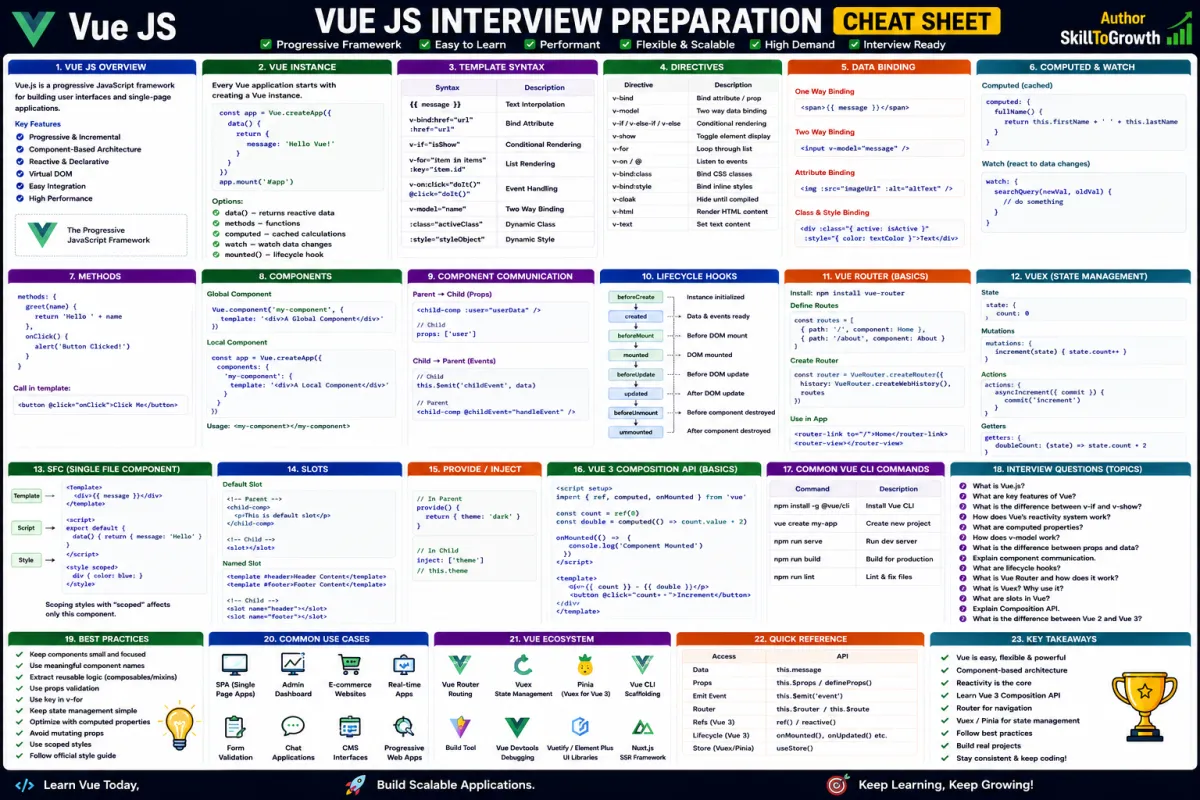
- What is a Vue component?
- Why are components important in modern frontend development?
- What is the difference between local and global components?
- Explain the relationship between parent and child components.
- What are nested components?
- What are dynamic components, and when should they be used?
- What are async components, and how do they improve performance?
- What is component communication in Vue.js?
- Why are reusable components important?
- What are the best practices for designing scalable Vue components?