Vue Options API: Understanding Data, Methods, Computed, Watch, Lifecycle Hooks & Migration to the Composition API
Vue Options API: Understanding Data, Methods, Computed, Watch, Lifecycle Hooks & Migration to the Composition API
SkilltoGrowth Expert
Published on July 31, 2026Before the introduction of the Composition API in Vue 3, the Options API was the standard way of building Vue applications. For years, developers used it to create everything from simple websites to large enterprise applications. Even today, thousands of production applications continue to use the Options API because of its simplicity, readability, and well-structured approach.
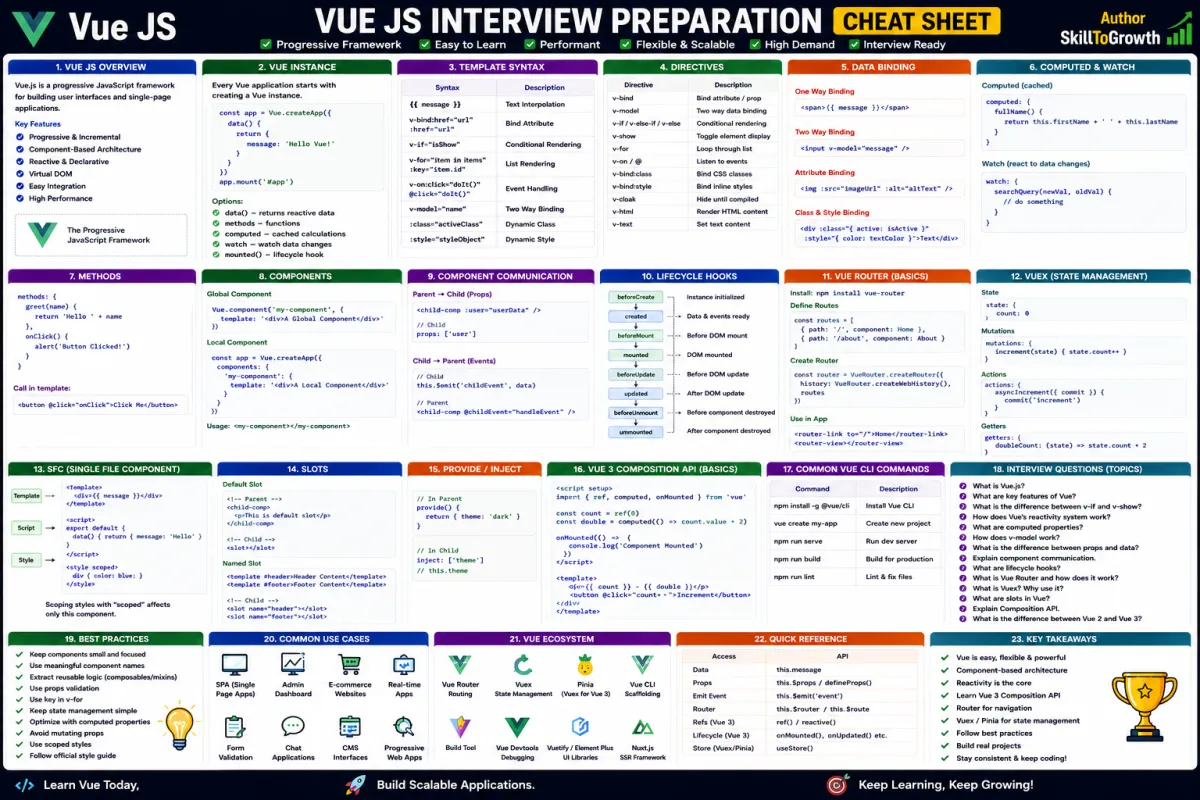
The Options API organizes component logic into predefined sections such as data, methods, computed, watch, and lifecycle hooks. Each section has a specific responsibility, making it easy for beginners to understand how a Vue component is structured. Instead of writing all application logic in one place, developers categorize functionality according to its purpose.
Imagine you're building an online shopping application. Product information is stored in the data section, user interactions such as adding products to the cart are handled inside methods, discounted prices are calculated using computed properties, product searches are monitored using watch, and API calls are performed inside lifecycle hooks. This clear separation makes the application easier to read and maintain.
Although Vue 3 introduced the Composition API, the Options API remains fully supported and is still an excellent choice for many projects. Understanding both approaches allows developers to work confidently with older applications while gradually adopting modern Vue development practices.
In this chapter, you'll learn how the Options API is structured, understand its core building blocks, explore lifecycle hooks, discover how it works alongside the Composition API, and learn practical migration strategies for modern Vue applications.
Why the Options API Is Important
The Options API provides a simple and organized approach to component development.
Instead of requiring developers to decide how to structure every component, Vue provides predefined sections that encourage consistency and readability.
Learning the Options API helps developers:
🔸 Understand existing Vue projects
🔸 Build well-structured components
🔸 Learn Vue fundamentals quickly
🔸 Maintain legacy applications
🔸 Understand Vue's evolution
🔸 Transition smoothly to the Composition API
🔸 Improve application organization
🔸 Collaborate with teams working on older Vue projects
Because many organizations continue to use the Options API, understanding it remains a valuable skill.
Understanding the Options API
The Options API organizes a Vue component into several dedicated sections, with each section responsible for a particular aspect of the application's behavior.
Rather than grouping logic by business features, the Options API groups it according to its type.
For example:
- Application data belongs in the data section.
- User actions are handled in methods.
- Derived values are created using computed.
- Data changes are monitored with watch.
- Component events are handled using lifecycle hooks.
This structure makes components easy to understand, especially for developers who are new to Vue.
For small and medium-sized applications, the Options API often provides a clean and straightforward development experience.
Data
The data section stores the reactive information used throughout the component.
Whenever data changes, Vue automatically updates the corresponding parts of the user interface.
Typical examples include:
🔸 Product information
🔸 User profiles
🔸 Shopping cart items
🔸 Search keywords
🔸 Login status
🔸 Dashboard statistics
🔸 Notification counters
🔸 Form values
The data section acts as the component's state, providing the information required to render the interface.
Keeping only UI-related state inside data helps maintain a clean component structure.
Methods
The methods section contains functions that perform actions in response to user interactions or application events.
Whenever users click buttons, submit forms, search for products, or navigate through the application, methods handle the associated business logic.
Common examples include:
🔸 User authentication
🔸 Form submission
🔸 Product search
🔸 Shopping cart updates
🔸 API requests
🔸 Navigation
🔸 Data filtering
🔸 Logout operations
Methods should focus on performing actions rather than calculating values.
Keeping methods organized and focused on a single responsibility improves readability and maintainability.
Computed
Applications frequently display values that depend on existing data.
Instead of calculating these values repeatedly throughout the component, Vue provides Computed Properties.
Computed properties automatically generate values whenever their dependencies change.
Common examples include:
🔸 Total order value
🔸 Discounted prices
🔸 Customer full name
🔸 Filtered product lists
🔸 Shopping cart totals
🔸 Tax calculations
🔸 Product availability
🔸 Dashboard summaries
One of the biggest advantages of computed properties is automatic caching.
Vue recalculates the value only when the underlying data changes, improving application performance while keeping templates clean.
Watch
Sometimes applications need to perform additional tasks whenever specific data changes.
Examples include:
🔸 Calling an external API
🔸 Saving user preferences
🔸 Updating local storage
🔸 Sending analytics
🔸 Displaying notifications
🔸 Validating form input
🔸 Refreshing dashboard data
🔸 Synchronizing application state
The watch section allows developers to observe reactive data and execute custom logic whenever changes occur.
Unlike computed properties, which generate derived values, watch is designed for handling side effects.
It is particularly useful when applications need to communicate with external systems or perform asynchronous operations.
Lifecycle Hooks
Every Vue component progresses through several stages during its existence.
A component is created, rendered, updated as data changes, and eventually removed from the application.
The Lifecycle Hooks provided by the Options API allow developers to execute code at each of these stages.
Lifecycle hooks are commonly used for:
🔸 Loading API data
🔸 Initializing application settings
🔸 Registering event listeners
🔸 Starting timers
🔸 Connecting third-party libraries
🔸 Cleaning resources
🔸 Saving component state
🔸 Cancelling background tasks
Using lifecycle hooks ensures that initialization and cleanup logic occurs at the correct time, improving both reliability and application performance.
Mixing Options API with Composition API
Vue 3 allows developers to use both the Options API and the Composition API within the same project.
This flexibility is particularly valuable for organizations migrating large applications.
Instead of rewriting every component immediately, teams can gradually introduce the Composition API while continuing to maintain existing Options API components.
For example, an organization may:
- Keep older components using the Options API.
- Build new features using the Composition API.
- Reuse existing business logic where appropriate.
- Migrate components incrementally.
This gradual migration strategy reduces project risk while allowing teams to adopt modern Vue practices at their own pace.
However, mixing both approaches inside the same component should be done carefully to avoid unnecessary complexity and inconsistent coding styles.
Migration Guide
As Vue continues to evolve, many organizations are transitioning from the Options API to the Composition API.
Migration does not necessarily require rewriting an entire application.
Instead, developers typically migrate components gradually as they add new features or perform maintenance.
A practical migration strategy includes:
🔸 Understand the existing component structure before making changes.
🔸 Begin with smaller, low-risk components.
🔸 Convert reusable business logic into composables.
🔸 Replace duplicated logic with reusable functions.
🔸 Introduce the Composition API in new features.
🔸 Keep coding standards consistent across the project.
🔸 Test migrated components thoroughly.
🔸 Avoid large-scale rewrites unless absolutely necessary.
A gradual migration approach minimizes disruption while improving long-term maintainability.
When Should You Use the Options API?
Although the Composition API is now recommended for large applications, the Options API remains an excellent choice in many situations.
It is particularly suitable when:
🔸 Building small or medium-sized applications.
🔸 Learning Vue fundamentals.
🔸 Maintaining existing Vue projects.
🔸 Working with teams already experienced in the Options API.
🔸 Developing simple user interfaces with limited business logic.
Choosing the right API depends on project size, team experience, and long-term maintenance requirements.
Best Practices
Following consistent development practices helps developers build clean and maintainable Vue components using the Options API.
Recommended Practices
🔸 Keep the data section focused on reactive state only.
🔸 Use methods for actions rather than calculations.
🔸 Prefer computed properties for derived values.
🔸 Reserve watch for handling side effects.
🔸 Organize related logic clearly.
🔸 Keep components focused on a single responsibility.
🔸 Minimize duplicated business logic.
🔸 Follow consistent naming conventions.
🔸 Avoid unnecessarily large components.
🔸 Plan migrations carefully when introducing the Composition API.
Common Mistakes
Developers new to Vue often make similar mistakes while working with the Options API.
Common Mistakes
🔸 Performing complex calculations inside methods instead of computed properties.
🔸 Using watch for simple calculations.
🔸 Mixing unrelated responsibilities inside a single component.
🔸 Creating oversized components with too many features.
🔸 Duplicating business logic across multiple components.
🔸 Ignoring lifecycle cleanup tasks.
🔸 Mixing Options API and Composition API without a clear architecture.
🔸 Migrating entire applications without proper planning.
Recognizing these issues early helps developers build applications that remain easier to maintain as they grow.
Interview Questions
- What is the Vue Options API?
- Why was the Options API introduced?
- What is the purpose of the data section?
- When should methods be used?
- What are computed properties, and why are they important?
- What is the difference between computed properties and watch?
- What are lifecycle hooks in the Options API?
- Can the Options API and Composition API be used together?
- What is the recommended approach for migrating to the Composition API?
- What are the best practices for organizing Vue components using the Options API?