HTTP Fundamentals: Understanding HTTP Requests, Responses, Methods, Status Codes, Headers, URL Structure, Cookies, Sessions & MIME Types
HTTP Fundamentals: Understanding HTTP Requests, Responses, Methods, Status Codes, Headers, URL Structure, Cookies, Sessions & MIME Types
SkilltoGrowth Expert
Published on July 28, 2026Every website, mobile application, and web service you use today relies on one fundamental protocol—HTTP (Hypertext Transfer Protocol). Whether you are checking your email, browsing an online store, watching videos on YouTube, or using a banking application, HTTP is quietly working behind the scenes to transfer information between your device and a web server.
As developers, we often focus on writing APIs, designing user interfaces, or building backend services without fully understanding how communication actually happens over the web. However, every REST API, microservice, or cloud application is built on top of HTTP. Without understanding HTTP, it becomes difficult to design efficient APIs, troubleshoot communication issues, or optimise application performance.
HTTP is much more than simply sending data from a client to a server. It defines how requests should be made, how servers should respond, which operation should be performed, how resources are identified, and how different types of content should be transferred. It also provides standard ways to communicate success, errors, authentication, caching, and security.
This chapter introduces the fundamentals of HTTP in a practical and easy-to-understand manner. Rather than treating HTTP as a collection of technical terms, we'll explore how it powers real-world applications and why every backend, frontend, and mobile developer should master its concepts.
Why HTTP Fundamentals Matter
Modern software rarely works in isolation. Mobile apps communicate with backend servers, websites retrieve information from cloud services, payment gateways process online transactions, and microservices constantly exchange data with one another. Nearly all of this communication happens through HTTP.
A strong understanding of HTTP helps developers:
- Build well-designed REST APIs
- Debug client-server communication
- Handle errors more effectively
- Improve application performance
- Design secure web services
- Understand browser behaviour
- Work confidently with frontend and backend technologies
Whether you're developing Android applications, Flutter apps, React websites, or Spring Boot APIs, HTTP remains the common language connecting every component.
HTTP Overview
HTTP stands for Hypertext Transfer Protocol. It is an application-layer protocol that defines how clients and servers exchange information across a network.
A client is any application requesting information, such as:
- Web browsers
- Mobile applications
- Desktop software
- API testing tools
- Other backend services
A server receives those requests, processes them, and returns an appropriate response.
When you type a website address into your browser, the browser sends an HTTP request asking the server for the webpage. The server processes the request and responds with HTML, images, JavaScript files, and other resources required to display the page.
This request-response communication happens thousands of times every second across the internet.
Although HTTP originally focused on transferring web pages, today it is widely used for APIs, cloud platforms, IoT devices, streaming services, payment systems, and enterprise applications.
HTTP Request and Response
HTTP communication always follows a simple conversation.
First, the client sends a request.
Then the server processes that request.
Finally, the server returns a response.
An HTTP request usually contains several pieces of information:
- The target URL
- HTTP method
- Request headers
- Optional request body
- Query parameters
For example, when a mobile banking application asks for your account details, it sends an HTTP request containing your authentication token and the endpoint representing your account.
The server validates your identity, retrieves the requested data from the database, and sends an HTTP response containing your account information.
Every HTTP response generally includes:
- Status code
- Response headers
- Response body
The response body might contain JSON, HTML, XML, images, videos, or any other supported data format depending on the application's requirements.
Understanding this request-response cycle is essential because every REST API is built upon it.
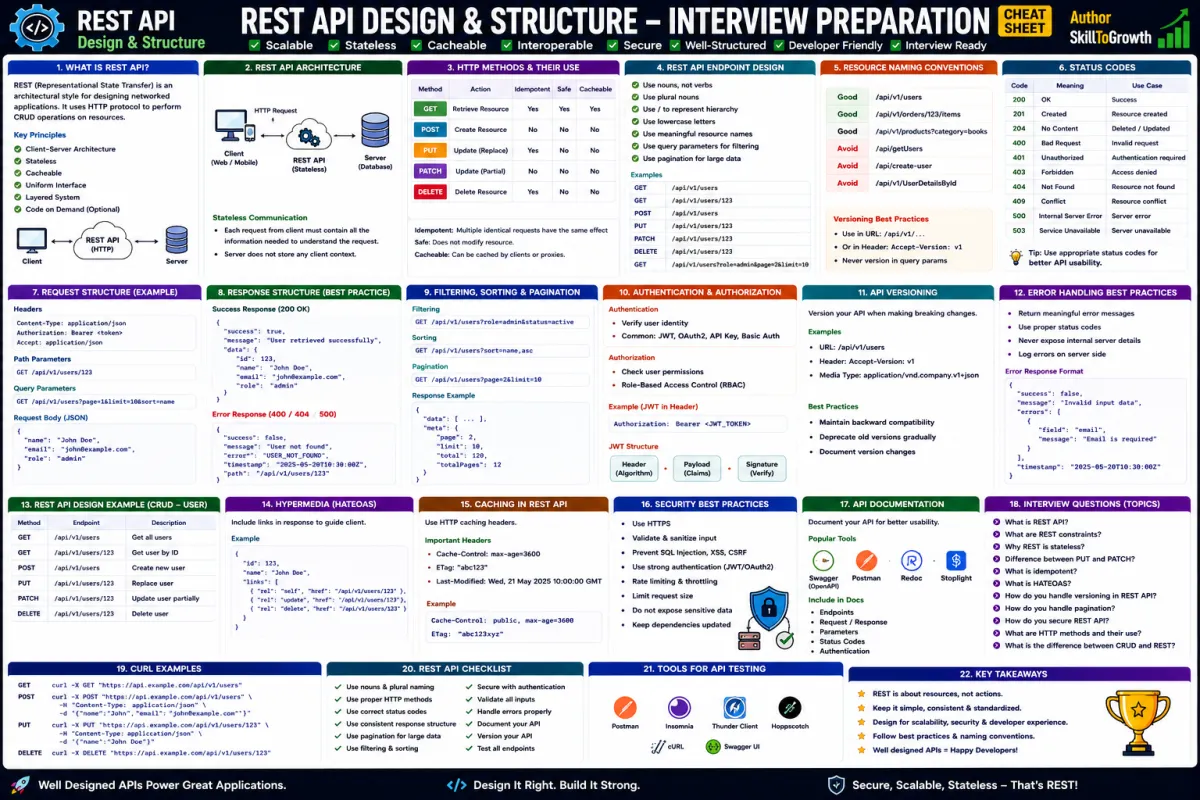
HTTP Methods
HTTP methods describe the action a client wants the server to perform on a resource. Choosing the correct method makes APIs predictable, maintainable, and consistent.
GET
GET retrieves information without modifying anything on the server.
For example, requesting a product catalogue, viewing employee details, or fetching weather information all use GET requests. Since GET only retrieves data, it is considered safe and can often be cached by browsers or proxy servers.
POST
POST is used to create new resources.
When users register an account, submit a contact form, upload a document, or place an online order, the application typically sends a POST request containing the required data.
Unlike GET, POST changes the server's state by creating new information.
PUT
PUT replaces an existing resource with new data.
Suppose an employee profile contains ten fields. If a PUT request is used, the expectation is that the complete employee object is sent, replacing the previous version entirely.
PUT is considered idempotent because repeating the same request produces the same result.
PATCH
PATCH performs partial updates.
Instead of replacing the complete employee profile, a PATCH request might update only the employee's phone number or email address while leaving every other field unchanged.
PATCH reduces unnecessary data transfer and has become increasingly popular in modern REST APIs.
DELETE
DELETE removes an existing resource.
Deleting a customer account, removing an uploaded image, or cancelling stored information generally uses the DELETE method.
A successful DELETE request typically returns confirmation that the resource has been removed or is no longer available.
HTTP Status Codes
Once the server processes a request, it communicates the outcome using an HTTP status code.
Status codes help clients understand whether the request succeeded or failed and what action should be taken next.
HTTP status codes are grouped into five categories.
1xx – Informational
These indicate that the request has been received and processing continues.
2xx – Success
The request completed successfully.
Some common examples include:
- 200 OK
- 201 Created
- 204 No Content
These responses indicate that the requested operation completed as expected.
3xx – Redirection
These responses tell the client that the requested resource has moved or additional action is required.
Examples include:
- 301 Moved Permanently
- 302 Found
- 304 Not Modified
4xx – Client Errors
These occur when the client sends an incorrect request.
Common examples include:
- 400 Bad Request
- 401 Unauthorized
- 403 Forbidden
- 404 Not Found
These errors usually indicate problems that the client should correct.
5xx – Server Errors
These indicate that something went wrong while processing the request on the server.
Examples include:
- 500 Internal Server Error
- 502 Bad Gateway
- 503 Service Unavailable
Such responses generally require investigation by the server administrator or development team.
HTTP Headers
Headers provide additional information about requests and responses.
Instead of carrying the main business data, headers describe how that data should be processed.
Some commonly used request headers include:
- Authorization
- Content-Type
- Accept
- User-Agent
- Accept-Language
Similarly, response headers may include:
- Content-Type
- Cache-Control
- Set-Cookie
- Content-Length
- Server
Headers play an important role in authentication, security, caching, compression, localisation, and content negotiation.
URL Structure
Every HTTP request targets a specific URL that identifies a resource on the server.
A typical URL consists of several parts:
- Protocol
- Domain name
- Port (optional)
- Path
- Query parameters
- Fragment (optional)
For example, when requesting product information from an e-commerce website, the URL identifies exactly which resource the client wishes to access.
Well-designed URLs are readable, meaningful, and resource-oriented, making APIs easier to understand and maintain.
Query Parameters
Query parameters provide additional information to the server without changing the resource itself.
They are commonly used for:
- Searching
- Filtering
- Sorting
- Pagination
- Language selection
For instance, an online shopping application may allow users to search for laptops, sort products by price, and display only the first twenty results. Instead of creating separate endpoints for every possible combination, query parameters allow these options to be passed dynamically.
Because query parameters are optional in many cases, they provide flexibility while keeping API endpoints clean and reusable.
Path Variables
Path variables identify specific resources directly within the URL path.
Unlike query parameters, which modify how results are returned, path variables identify which resource should be accessed.
For example, requesting details for customer number 105 or order number 250 typically involves including those identifiers within the URL path.
Path variables improve readability and closely follow RESTful design principles because resources are represented directly by their unique identifiers.
Cookies vs Sessions
Many web applications need to remember users after they log in.
Cookies and sessions work together to achieve this goal, although they serve different purposes.
A cookie is a small piece of information stored in the user's browser. It may contain session identifiers, user preferences, language settings, or other lightweight data.
A session, on the other hand, is stored on the server. The browser usually stores only a session identifier inside a cookie, while the actual user information remains securely on the server.
Cookies are lightweight and improve user convenience, whereas sessions provide greater security for sensitive information.
Modern applications increasingly rely on token-based authentication such as JWT, but cookies and sessions remain widely used across enterprise systems.
MIME Types
Not every HTTP response contains the same kind of information.
Sometimes a server returns JSON.
Other times it returns HTML, PDF documents, images, videos, CSS files, or JavaScript.
MIME (Multipurpose Internet Mail Extensions) types tell the client exactly what kind of content is being transferred.
Some common MIME types include:
application/jsontext/htmltext/plainapplication/xmlimage/pngimage/jpegapplication/pdftext/css
When a browser receives a response, it examines the MIME type to determine how the content should be handled. A PDF might open in a document viewer, an image may be displayed directly, while JSON is typically processed by an application or API client.
Correctly configuring MIME types ensures that clients interpret responses accurately and securely.
Best Practices
When working with HTTP, following established standards improves interoperability and makes APIs easier to consume.
Some recommended practices include:
- Use the appropriate HTTP method for every operation.
- Return meaningful status codes instead of generic responses.
- Design clean, resource-oriented URLs.
- Use HTTPS to encrypt communication.
- Keep headers concise and meaningful.
- Validate all client input before processing requests.
- Return consistent response formats across all endpoints.
- Avoid exposing sensitive information in URLs.
Common Mistakes
Developers new to REST APIs often misuse HTTP by treating every request the same way.
Some common mistakes include:
- Using GET requests to modify server data.
- Returning incorrect status codes.
- Creating inconsistent URL structures.
- Ignoring HTTP caching capabilities.
- Exposing confidential information through query parameters.
- Sending unnecessary data in every request.
- Forgetting proper content types in responses.
Avoiding these mistakes leads to APIs that are more secure, scalable, and easier to maintain.
Chapter Summary
HTTP forms the foundation of modern web communication and is the protocol upon which REST APIs are built. Every interaction between clients and servers follows the request-response model, with HTTP methods defining actions, status codes indicating outcomes, headers providing metadata, and URLs identifying resources. Concepts such as query parameters, path variables, cookies, sessions, and MIME types further enhance how applications exchange and interpret information. A strong understanding of these fundamentals enables developers to build robust, secure, and standards-compliant APIs that integrate seamlessly across web, mobile, and cloud platforms.
Interview Questions
- What is HTTP, and why is it important?
- Explain the HTTP request-response lifecycle.
- What is the difference between GET and POST?
- When would you use PUT instead of PATCH?
- What are HTTP status codes? Explain the different categories.
- What is the purpose of HTTP headers?
- Explain the structure of a URL.
- What is the difference between query parameters and path variables?
- How do cookies differ from sessions?
- What are MIME types, and why are they important in HTTP communication?