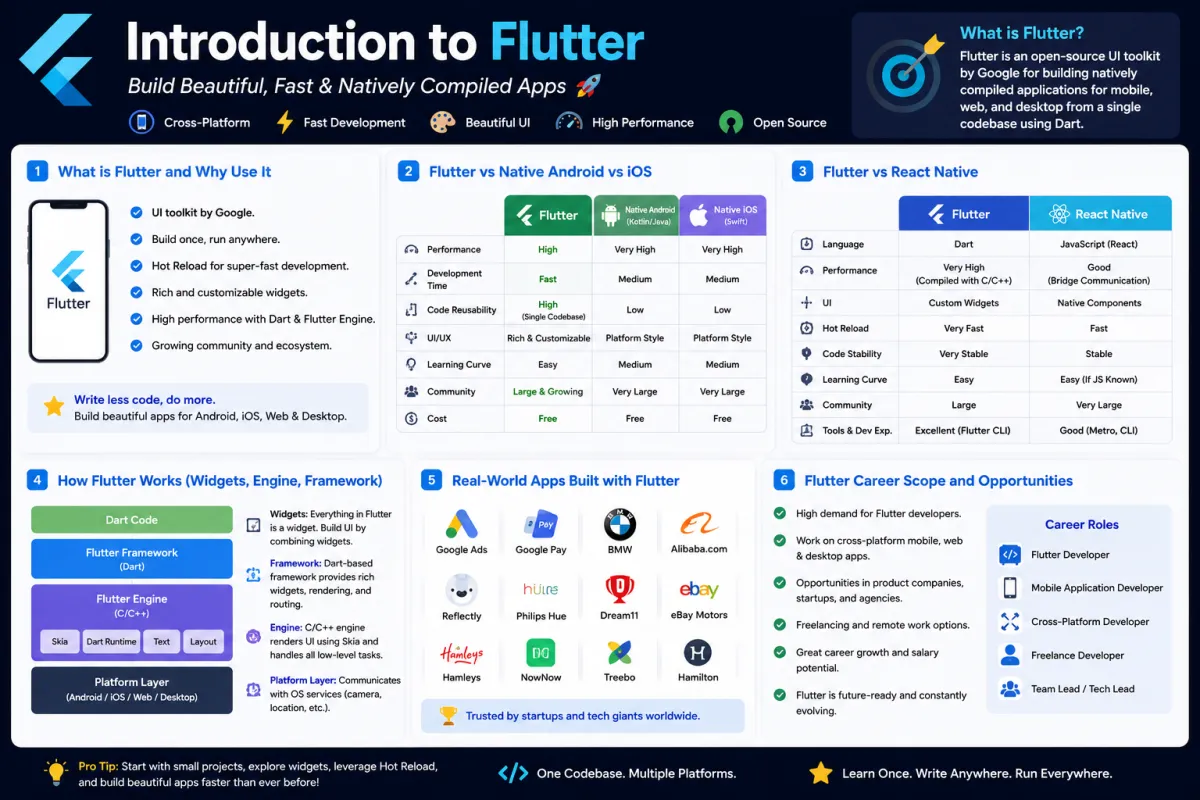
Introduction to Flutter: Everything You Need to Know Before You Start
Introduction to Flutter
SkilltoGrowth Expert
Published on July 13, 2026Flutter has become one of the fastest-growing cross-platform application development frameworks in the world. From startups to enterprise companies, developers are choosing Flutter because it allows them to build beautiful, high-performance applications for multiple platforms using a single codebase.
Whether you're an Android developer looking to expand your skills or a beginner exploring mobile development, Flutter provides an excellent starting point. Backed by Google, Flutter continues to evolve rapidly and has become a preferred choice for building Android, iOS, Web, Desktop, and Embedded applications.
In this chapter, you'll learn what Flutter is, why developers love it, how it compares with native Android and React Native, understand its architecture, explore real-world Flutter applications, and discover career opportunities available for Flutter developers.
Why Learn Flutter?
Mobile application development traditionally required separate teams for Android and iOS development. This meant writing two different codebases, maintaining separate teams, and spending more time and money.
Flutter solves this challenge by allowing developers to build applications for multiple platforms from a single codebase.
Benefits of Learning Flutter
🔸 Single codebase for multiple platforms
🔸 Faster development using Hot Reload
🔸 Beautiful customizable UI
🔸 High performance
🔸 Strong community support
🔸 Backed by Google
🔸 Growing industry demand
Learning Flutter not only improves your development skills but also increases your career opportunities across multiple platforms.
What is Flutter?
Flutter is Google's open-source UI toolkit used to build natively compiled applications for Android, iOS, Web, Windows, macOS, Linux, and embedded devices using a single programming language called Dart.
Unlike many other cross-platform frameworks, Flutter does not rely on native UI components. Instead, it renders everything using its own rendering engine, giving developers complete control over the application's appearance.
This approach enables Flutter applications to look consistent across different platforms.
Key Features of Flutter
🔸 Open source
🔸 Uses Dart programming language
🔸 Cross-platform development
🔸 Native-like performance
🔸 Rich widget library
🔸 Hot Reload support
🔸 Material Design and Cupertino widgets
Flutter focuses on building visually appealing applications without sacrificing performance.
Why Use Flutter?
Flutter has become popular because it significantly reduces development time while maintaining excellent application performance.
Instead of developing separate Android and iOS applications, developers can reuse most of their code.
Advantages of Flutter
🔸 Faster application development
🔸 Reduced maintenance cost
🔸 Excellent UI customization
🔸 Consistent user experience
🔸 Rapid prototyping
🔸 Easier debugging
🔸 Large ecosystem of packages
These advantages make Flutter an attractive choice for startups, businesses, and freelance developers.
Flutter vs Native Android vs iOS
Choosing between Flutter and native development depends on your project requirements, performance expectations, and available resources.
Native Android Development
Native Android applications are built using Kotlin or Java and provide direct access to Android APIs.
Advantages
🔸 Full access to Android features
🔸 Excellent platform integration
🔸 Best performance
🔸 Ideal for Android-only applications
Limitations
🔸 Android only
🔸 Separate iOS development required
🔸 Higher development cost
Native iOS Development
Native iOS applications are developed using Swift or Objective-C.
Advantages
🔸 Excellent iOS performance
🔸 Full access to Apple APIs
🔸 Best platform optimization
Limitations
🔸 iOS only
🔸 Separate Android application required
🔸 Higher maintenance cost
Flutter Development
Flutter allows developers to target multiple platforms simultaneously.
Advantages
🔸 Single codebase
🔸 Fast development
🔸 Beautiful UI
🔸 Near-native performance
🔸 Excellent developer experience
When Should You Choose Flutter?
🔸 Startup projects
🔸 MVP development
🔸 E-commerce apps
🔸 Business applications
🔸 Educational apps
🔸 Social networking apps
🔸 Cross-platform products
If your goal is to launch applications on both Android and iOS quickly, Flutter is an excellent choice.
Flutter vs React Native
Flutter and React Native are currently the two most popular cross-platform frameworks.
Although both solve similar problems, their approaches are very different.
Flutter
🔸 Uses Dart
🔸 Own rendering engine
🔸 Rich widget ecosystem
🔸 Consistent UI
🔸 Excellent animations
🔸 High performance
React Native
🔸 Uses JavaScript
🔸 Relies on native UI components
🔸 Large JavaScript ecosystem
🔸 Easy for React developers
🔸 Faster web transition
Flutter vs React Native Comparison
🔸 Flutter offers better UI consistency.
🔸 Flutter provides smoother animations.
🔸 React Native benefits from JavaScript familiarity.
🔸 Flutter has stronger control over rendering.
🔸 Both have excellent community support.
The right choice depends on your team's expertise and project requirements.
How Flutter Works
Understanding Flutter's architecture helps developers write better applications and troubleshoot issues more effectively.
Flutter is built using three major layers.
Flutter Architecture
🔸 Framework
🔸 Engine
🔸 Embedder
Each layer has a specific responsibility.
Flutter Framework
The Framework provides everything developers interact with while building applications.
It includes:
🔸 Widgets
🔸 Animation libraries
🔸 Navigation
🔸 State management
🔸 Material Design
🔸 Cupertino widgets
Most Flutter development happens within the Framework layer.
Flutter Engine
The Flutter Engine is responsible for rendering the user interface.
It includes:
🔸 Skia rendering engine
🔸 Dart runtime
🔸 Graphics rendering
🔸 Text rendering
🔸 Accessibility support
Because Flutter controls its own rendering engine, applications appear nearly identical across Android and iOS.
Flutter Embedder
The Embedder connects Flutter with the underlying operating system.
It provides access to:
🔸 Camera
🔸 GPS
🔸 Bluetooth
🔸 Storage
🔸 Sensors
🔸 Platform APIs
This allows Flutter applications to interact with native device features.
Understanding Widgets in Flutter
Widgets are the building blocks of every Flutter application.
Everything visible on the screen is a widget.
Examples include:
🔸 Text
🔸 Button
🔸 Image
🔸 Icon
🔸 AppBar
🔸 ListView
🔸 Container
🔸 Scaffold
Instead of traditional XML layouts like Android, Flutter builds user interfaces entirely using widgets.
Types of Widgets
Flutter provides two primary widget types.
Stateless Widget
Used when the UI does not change after it is created.
Common examples:
🔸 Logo
🔸 Static text
🔸 Icons
🔸 Headers
Stateful Widget
Used when the UI changes dynamically.
Examples include:
🔸 Login forms
🔸 Shopping carts
🔸 Counters
🔸 Chat screens
🔸 Product listings
Understanding the difference between Stateless and Stateful widgets is one of the most common Flutter interview topics.
Hot Reload: Flutter's Biggest Advantage
One of Flutter's most loved features is Hot Reload.
Instead of rebuilding the entire application after every change, Flutter updates only the modified code while preserving the application's current state.
Benefits of Hot Reload
🔸 Faster development
🔸 Instant UI updates
🔸 Improved productivity
🔸 Easier debugging
🔸 Better developer experience
Hot Reload significantly reduces development time compared to traditional mobile development.
Real-World Apps Built with Flutter
Flutter is no longer just a framework for small projects.
Many large companies use Flutter in production.
Popular Flutter Applications
🔸 Google Pay
🔸 BMW
🔸 Alibaba
🔸 eBay Motors
🔸 Toyota
🔸 Nubank
🔸 My BMW App
🔸 Hamilton Musical App
These applications demonstrate Flutter's ability to power large-scale commercial products.
Flutter Career Scope and Opportunities
The demand for Flutter developers has grown rapidly over the past few years as companies seek faster and more cost-effective ways to build cross-platform applications.
Organizations of all sizes—from startups to multinational enterprises—are hiring Flutter developers for mobile, web, and desktop projects.
Career Opportunities
🔸 Flutter Developer
🔸 Mobile Application Developer
🔸 Cross-Platform Developer
🔸 Full Stack Flutter Developer
🔸 Freelance Flutter Developer
🔸 Technical Consultant
🔸 Mobile Team Lead
Flutter also offers excellent opportunities for freelancers and entrepreneurs who want to build applications for multiple platforms with minimal development effort.
Skills Required to Become a Flutter Developer
Success as a Flutter developer requires more than just learning widgets.
A professional Flutter developer should understand:
🔸 Dart programming
🔸 Flutter widgets
🔸 State management
🔸 REST API integration
🔸 Local database
🔸 Firebase
🔸 Git and GitHub
🔸 Clean Architecture
🔸 Performance optimization
Developing these skills prepares you for real-world projects and technical interviews.
Common Mistakes Beginners Make
Many beginners encounter similar challenges while learning Flutter.
Common Mistakes
🔸 Learning widgets without understanding Dart
🔸 Ignoring widget lifecycle
🔸 Poor project structure
🔸 Mixing business logic inside UI
🔸 Overusing StatefulWidget
🔸 Ignoring responsive design
🔸 Not following Flutter best practices
Avoiding these mistakes early helps you build cleaner and more scalable applications.
Best Practices for Flutter Development
Professional Flutter applications follow consistent coding and architectural standards.
Recommended Practices
🔸 Learn Dart before Flutter
🔸 Keep widgets small and reusable
🔸 Organize projects into feature modules
🔸 Separate UI from business logic
🔸 Use state management appropriately
🔸 Optimize application performance
🔸 Follow Material Design guidelines
🔸 Test applications on multiple screen sizes
Following these practices results in maintainable, scalable, and production-ready Flutter applications.
Flutter Interview Questions
Flutter fundamentals are frequently covered in interviews for both freshers and experienced developers.
Frequently Asked Questions
🔸 What is Flutter?
🔸 Why is Flutter popular?
🔸 Flutter vs Native Android?
🔸 Flutter vs React Native?
🔸 What are Widgets?
🔸 Difference between StatelessWidget and StatefulWidget?
🔸 Explain Hot Reload.
🔸 How does Flutter work internally?
🔸 What is the Flutter Engine?
🔸 Why is Dart used in Flutter?
Being able to explain these concepts clearly demonstrates a strong understanding of Flutter fundamentals.